About Voyarc
Voyarc draws flight routes the way the earth actually works. Type
SYD-LAX-JFK, SYD-LHR and you get the great-circle path between every
pair of airports, per-leg distances and bearings in kilometres, miles or nautical
miles, and a link you can share.
The name is voyage + arc: the arc of a journey.
Why the lines curve
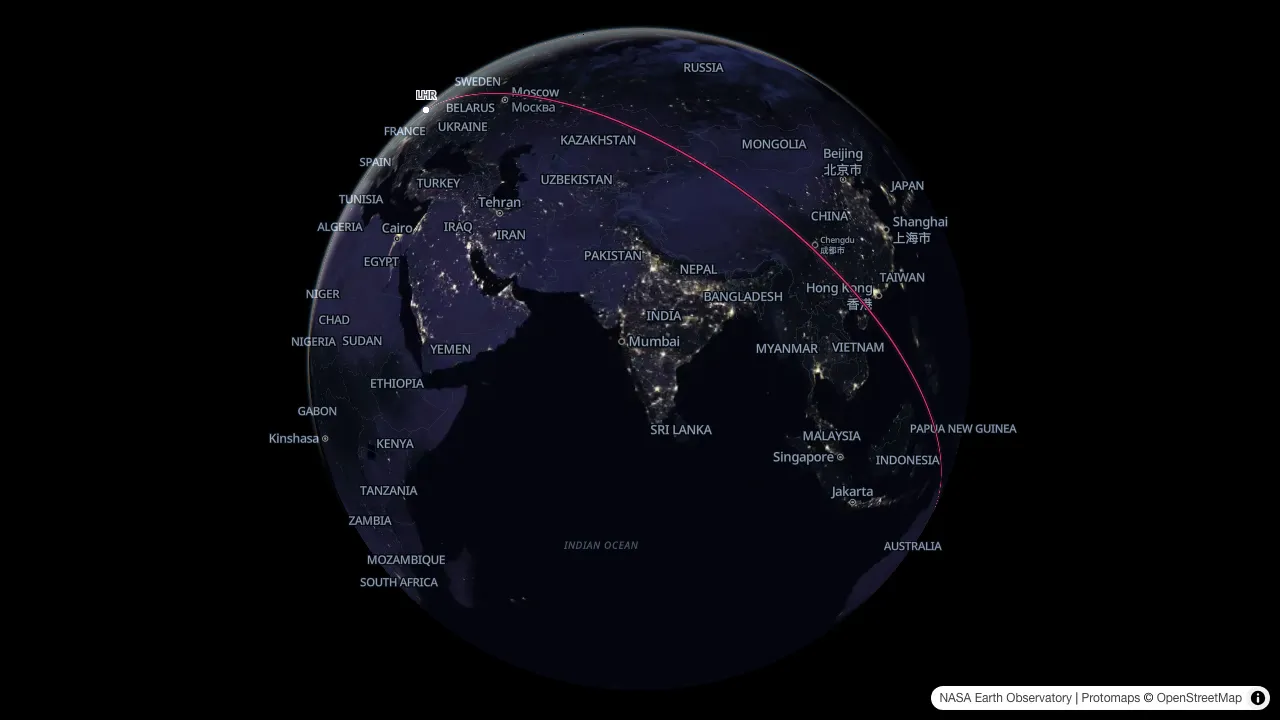
The shortest path between two airports follows a great circle: the line you get by slicing the globe through both points and its centre. A flat map has to cut that globe open and stretch it, so the shortest path arrives on screen as a curve. Sydney to London is about 17,000 km that way, bowing north-west over Southeast and Central Asia. Draw a straight line between the same two dots on a flat map and you get a different, longer flight. Voyarc draws the one an aircraft takes. The arc itself is a true great circle. The distance printed beside it is measured on the WGS84 ellipsoid, the slightly flattened shape the earth really has, so the number differs a little from a perfect-sphere figure.
What makes it different
- Aviation-grade geodesy. Real airport coordinates, geodesic distances and initial bearings per leg, arcs split cleanly at the antimeridian.
- It animates. Five shows: Network flies every route at once, Journey follows one trip leg by leg, Race puts an A-to-B flight you actually flew up against the great circle it was flying, Trace draws a round trip the way it was flown, and the Year in review plays a dated logbook back a year at a time. Watch them in the browser, or export PNG or MP4 in wide, square or vertical.
- It reads the flight you were on. Import the track (a FlightAware “Export to Google Earth” KML, a GPX from your own logger, or a Flightradar24 flight CSV) and it replaces your route list: for an A-to-B flight Voyarc measures how much further the aircraft really went, and a round trip is drawn as it was flown. The file is read in your browser and never uploaded.
- It says what the colours mean. A legend in the corner of the map: your title, your caption per route, or a journey's legs with their distances. It is drawn into every export and it rides in the link.
- Range rings. Circles around any airport at a radius you type, or at an ETOPS diversion time — 60, 120, 180 or 240 minutes at the speed you plan on.
-
It embeds live. Add
?embed=1to any route link and it becomes an interactive map you can drop into a page, not a screenshot. - It keeps your maps. Pro saves route lists as collections and files dated imports into one logbook, so a map, or last year's review, opens again without the file.
- Everything is a URL. Routes, colours, style and show all live in the link, so a map is something you can paste. Race and Trace are the exception: they need the file, so a link opens on Journey or Network.
Who makes it
Voyarc is built and run independently from Victoria, Australia, as a tool for people who like maps and flights. Say hello: [email protected].
Free and Pro
The free tier stays free: every show, every aspect ratio, PNG and MP4, plus live embeds, with no account. Free files carry the wordmark at a 1080p short edge. Pro is what pays for the hosting and the map tiles: it takes the wordmark off, exports at 4K, puts the Day and Night imagery and your range rings in the file, and maps a whole logbook instead of its first 25 legs. Prices are on the Pricing page.
Credits
- Airport data from OurAirports (public domain).
- Map data © OpenStreetMap contributors, ODbL, served as vector tiles built with Protomaps.
- Coastlines for the route log's fallback basemap from Natural Earth (public domain).
- Imagery for the premium styles from NASA Earth Observatory (Blue Marble and Black Marble, public domain). NASA does not endorse Voyarc.
Exports carry an attribution stamp. Please leave it on when you publish them: for OpenStreetMap data it is a licence condition, not a courtesy.
Not for navigation
Distances and bearings are computed geodesics, shown for illustration. Voyarc is not a flight-planning tool and must not be used for navigation or any operational purpose.